> ## Documentation Index
> Fetch the complete documentation index at: https://notification-docs.platform.ai71services.ai/llms.txt
> Use this file to discover all available pages before exploring further.
# High level design
The Notification Service is a scalable, multi-tenant platform that streamlines how applications send and manage notifications across various channels (Email, SMS, Push, etc.). By providing a unified interface and a robust set of APIs, the service handles all essential notification processes such as template management, delivery scheduling, and logging under one roof.
**Key components include:**
- Multi-Tenancy: Supports both B2C scenarios (single-tenant) and B2B scenarios (multiple Organizations under a single Product).
- Secure & Reliable Delivery: Integrates authentication and retry mechanisms to ensure messages reach their intended recipients.
- Audit Trails: Maintains detailed records of notifications and events for compliance, troubleshooting, and analytics.
- Scalability & Extensibility: Built on a modular architecture, allowing you to add new channels or adapt existing workflows with minimal overhead.
## High level design
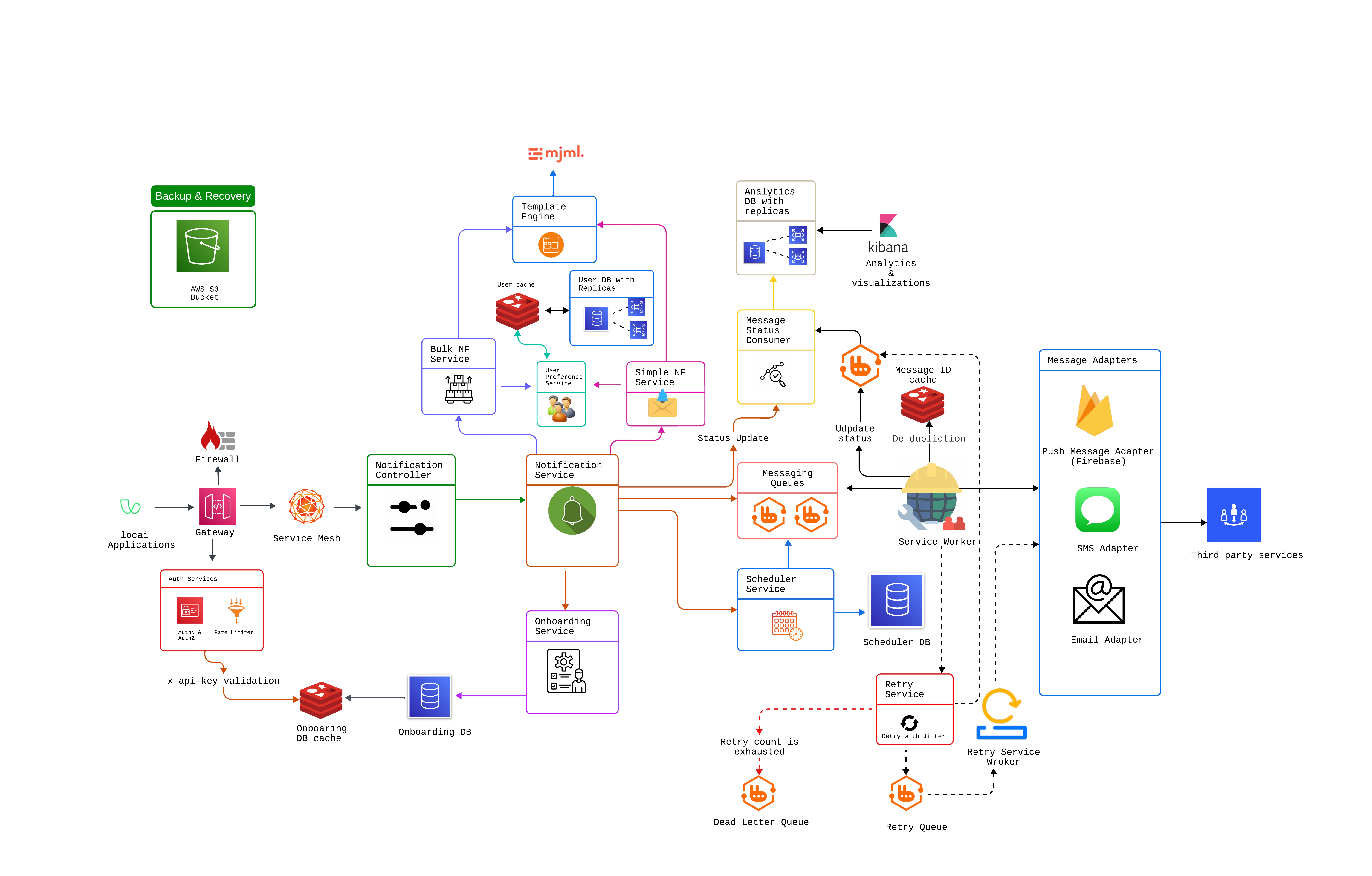 ***
## Queue Management at a Glance
Each channel (Email, SMS, Push) has its own main queue, retry queue, and dead-letter queue.
Prevents issues in one channel from impacting others.
Messages that fail are retried behind the scenes (no extra steps for you).
Persistently failing messages go to a dead-letter queue (DLQ) for review/reprocessing.
A simple dashboard lets you see how many messages are in each queue (main, retry, DLQ).
You can quickly identify problems—like a spike in failed messages—and take action.
Each queue is dedicated to a single channel; the retry logic and DLQ processes are decoupled from the main flow.
This design simplifies updates or additions (e.g., adding a new channel).
```mermaid theme={null}
---
config:
layout: fixed
---
flowchart TB
%% Email Channel
subgraph Email Channel
direction TB
EMain[Main Exchange: EmailExchange] -->|Publish| EQueue[Main Queue: emailQueue]
EQueue -->|On Failure| ERetry[Retry Exchange: EmailRetryExchange]
ERetry --> ERetryQ[Retry Queue: emailRetryQueue]
ERetryQ -->|Persistent Failure| EDead[Dead-Letter Exchange: EmailDLX]
EDead --> EDLQ[Dead-Letter Queue]
end
%% SMS Channel
subgraph SMS Channel
direction TB
SMain[Main Exchange: SmsExchange] -->|Publish| SQueue[Main Queue: smsQueue]
SQueue -->|On Failure| SRetry[Retry Exchange: SmsRetryExchange]
SRetry --> SRetryQ[Retry Queue: smsRetryQueue]
SRetryQ -->|Persistent Failure| SDead[Dead-Letter Exchange: SmsDLX]
SDead --> SDLQ[Dead-Letter Queue]
end
%% Push Channel
subgraph Push Channel
direction TB
PMain[Main Exchange: PushExchange] -->|Publish| PQueue[Main Queue: pushQueue]
PQueue -->|On Failure| PRetry[Retry Exchange: PushRetryExchange]
PRetry --> PRetryQ[Retry Queue: pushRetryQueue]
PRetryQ -->|Persistent Failure| PDead[Dead-Letter Exchange: PushDLX]
PDead --> PDLQ[Dead-Letter Queue]
end
```
Receives messages for a specific channel (e.g., EmailExchange) and routes them to the Main Queue (e.g., emailQueue).
If a message fails (due to a temporary error), it’s routed to the Retry Exchange (e.g., EmailRetryExchange) and placed in the Retry Queue (e.g., emailRetryQueue).
After a delay or certain retry logic, the message is re-consumed.
If a message persists in failing (exceeding maximum retries), it’s routed to the Dead-Letter Exchange (e.g., EmailDLX) and ends up in the Dead-Letter Queue.
Messages in the Dead-Letter Queue can be manually inspected or reprocessed later.
***
### Benefits
* **Clear Channel Segregation**: Email, SMS, and Push each have distinct flows, preventing cross-channel interference.
* **Resilience**: Automatic retries handle transient failures, while the dead-letter flow prevents stuck messages from blocking the main queue.
* **Visibility**: You can easily see which queues have messages, how many are retrying, and whether any have ended up in the dead-letter queue.
* **Maintainability**: Because each channel’s flow is separate, you can add or modify channels (e.g., a new “WhatsApp” channel) without disrupting the existing setup.
***
## Queue Management at a Glance
Each channel (Email, SMS, Push) has its own main queue, retry queue, and dead-letter queue.
Prevents issues in one channel from impacting others.
Messages that fail are retried behind the scenes (no extra steps for you).
Persistently failing messages go to a dead-letter queue (DLQ) for review/reprocessing.
A simple dashboard lets you see how many messages are in each queue (main, retry, DLQ).
You can quickly identify problems—like a spike in failed messages—and take action.
Each queue is dedicated to a single channel; the retry logic and DLQ processes are decoupled from the main flow.
This design simplifies updates or additions (e.g., adding a new channel).
```mermaid theme={null}
---
config:
layout: fixed
---
flowchart TB
%% Email Channel
subgraph Email Channel
direction TB
EMain[Main Exchange: EmailExchange] -->|Publish| EQueue[Main Queue: emailQueue]
EQueue -->|On Failure| ERetry[Retry Exchange: EmailRetryExchange]
ERetry --> ERetryQ[Retry Queue: emailRetryQueue]
ERetryQ -->|Persistent Failure| EDead[Dead-Letter Exchange: EmailDLX]
EDead --> EDLQ[Dead-Letter Queue]
end
%% SMS Channel
subgraph SMS Channel
direction TB
SMain[Main Exchange: SmsExchange] -->|Publish| SQueue[Main Queue: smsQueue]
SQueue -->|On Failure| SRetry[Retry Exchange: SmsRetryExchange]
SRetry --> SRetryQ[Retry Queue: smsRetryQueue]
SRetryQ -->|Persistent Failure| SDead[Dead-Letter Exchange: SmsDLX]
SDead --> SDLQ[Dead-Letter Queue]
end
%% Push Channel
subgraph Push Channel
direction TB
PMain[Main Exchange: PushExchange] -->|Publish| PQueue[Main Queue: pushQueue]
PQueue -->|On Failure| PRetry[Retry Exchange: PushRetryExchange]
PRetry --> PRetryQ[Retry Queue: pushRetryQueue]
PRetryQ -->|Persistent Failure| PDead[Dead-Letter Exchange: PushDLX]
PDead --> PDLQ[Dead-Letter Queue]
end
```
Receives messages for a specific channel (e.g., EmailExchange) and routes them to the Main Queue (e.g., emailQueue).
If a message fails (due to a temporary error), it’s routed to the Retry Exchange (e.g., EmailRetryExchange) and placed in the Retry Queue (e.g., emailRetryQueue).
After a delay or certain retry logic, the message is re-consumed.
If a message persists in failing (exceeding maximum retries), it’s routed to the Dead-Letter Exchange (e.g., EmailDLX) and ends up in the Dead-Letter Queue.
Messages in the Dead-Letter Queue can be manually inspected or reprocessed later.
***
### Benefits
* **Clear Channel Segregation**: Email, SMS, and Push each have distinct flows, preventing cross-channel interference.
* **Resilience**: Automatic retries handle transient failures, while the dead-letter flow prevents stuck messages from blocking the main queue.
* **Visibility**: You can easily see which queues have messages, how many are retrying, and whether any have ended up in the dead-letter queue.
* **Maintainability**: Because each channel’s flow is separate, you can add or modify channels (e.g., a new “WhatsApp” channel) without disrupting the existing setup.