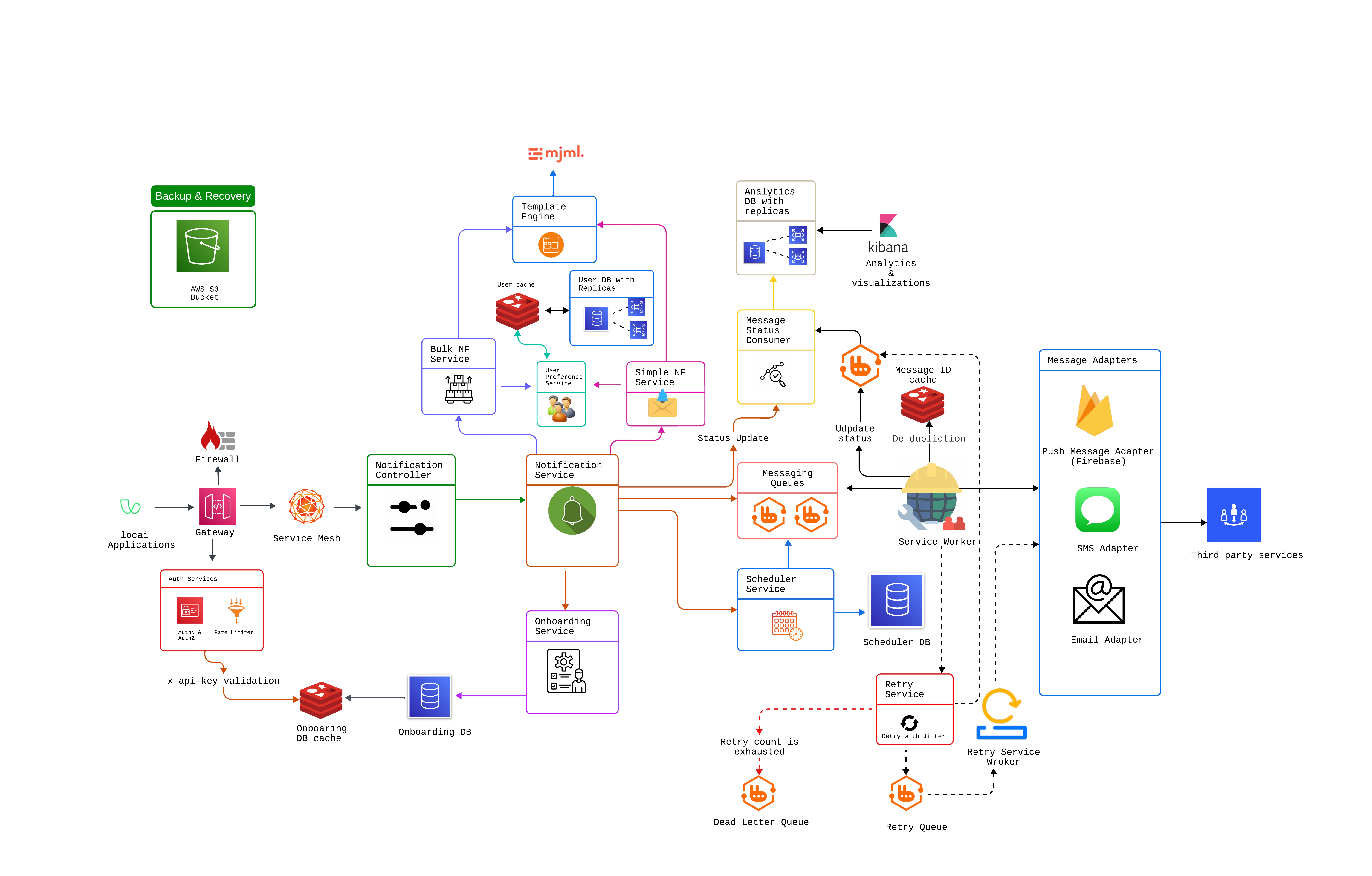
The Notification Service is a scalable, multi-tenant platform that streamlines how applications send and manage notifications across various channels (Email, SMS, Push, etc.). By providing a unified interface and a robust set of APIs, the service handles all essential notification processes such as template management, delivery scheduling, and logging under one roof.Key components include:
Multi-Tenancy: Supports both B2C scenarios (single-tenant) and B2B scenarios (multiple Organizations under a single Product).
Secure & Reliable Delivery: Integrates authentication and retry mechanisms to ensure messages reach their intended recipients.
Audit Trails: Maintains detailed records of notifications and events for compliance, troubleshooting, and analytics.
Scalability & Extensibility: Built on a modular architecture, allowing you to add new channels or adapt existing workflows with minimal overhead.
Each channel (Email, SMS, Push) has its own main queue, retry queue, and dead-letter queue.
Prevents issues in one channel from impacting others.
Automatic Retries & Dead-Letter Handling
Messages that fail are retried behind the scenes (no extra steps for you).
Persistently failing messages go to a dead-letter queue (DLQ) for review/reprocessing.
Dashboard Visibility
A simple dashboard lets you see how many messages are in each queue (main, retry, DLQ).
You can quickly identify problems—like a spike in failed messages—and take action.
Separation of Concerns
Each queue is dedicated to a single channel; the retry logic and DLQ processes are decoupled from the main flow.
This design simplifies updates or additions (e.g., adding a new channel).
1
Main Exchange
Receives messages for a specific channel (e.g., EmailExchange) and routes them to the Main Queue (e.g., emailQueue).
2
Retry Exchange & Queue
If a message fails (due to a temporary error), it’s routed to the Retry Exchange (e.g., EmailRetryExchange) and placed in the Retry Queue (e.g., emailRetryQueue).
After a delay or certain retry logic, the message is re-consumed.
3
Dead-Letter Exchange
If a message persists in failing (exceeding maximum retries), it’s routed to the Dead-Letter Exchange (e.g., EmailDLX) and ends up in the Dead-Letter Queue.
Messages in the Dead-Letter Queue can be manually inspected or reprocessed later.
Clear Channel Segregation: Email, SMS, and Push each have distinct flows, preventing cross-channel interference.
Resilience: Automatic retries handle transient failures, while the dead-letter flow prevents stuck messages from blocking the main queue.
Visibility: You can easily see which queues have messages, how many are retrying, and whether any have ended up in the dead-letter queue.
Maintainability: Because each channel’s flow is separate, you can add or modify channels (e.g., a new “WhatsApp” channel) without disrupting the existing setup.